See how a page leans before you finish reading it
A Chrome extension that rates the page in your current tab as four simple bars, using your own OpenRouter key.
What it does
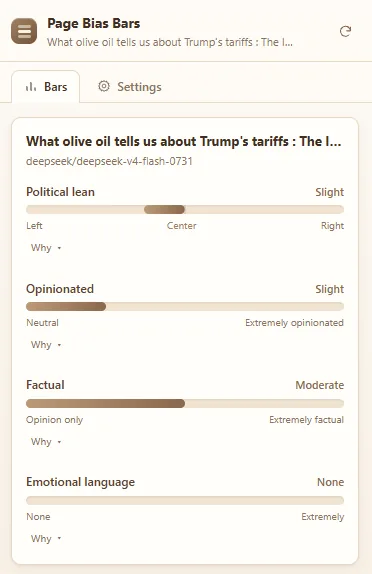
Page Bias Bars reads the article in your current tab and turns the result into visual bars you can judge at a glance instead of a wall of text. It is meant to be a quick second opinion on the tone of what you are reading, not a verdict on whether it is true.
Political lean, how opinionated the page is, how factual it is, and how emotional the wording is. Each bar fills to wherever the model places the page.
Add your own OpenRouter key once and the extension runs on whatever model you pick. There is no account, and nothing is billed through me.
No extra OpenRouter costs to analyze pages. A one-time $4 unlock adds a "Why" reason under every bar plus unlimited custom bars.
How to get it
Page Bias Bars is published on the Chrome Web Store. Open the
listing
and choose Add to Chrome. If you prefer to load it yourself, enable Developer mode on
chrome://extensions, choose Load unpacked, and point it at the extension folder.
The extension sends page text to OpenRouter to be rated. Read the privacy policy for the full detail.